
Not every new product launch needs a major campaign. And not every campaign has a strong enough product focus.
With mobile apps, situations often arise that offer clear potential: new content, a seasonal challenge, a special event, a live stream, a tournament or a major update that gives users a reason to come back. The problem is that if you only communicate this moment through your own channels, part of your audience may not pick up on it at all.
This is the main strength of In-App Events. They do not focus solely on how to present the app more effectively. Rather, they ask: ‘What is happening in the app right now, and why should the user get involved?’
For companies and product teams, this is an important distinction. An in-app event is neither a general presentation of the app nor a traditional promotional campaign. It is a specific moment within the app that has a beginning, an end and a clear call to action.
If such a moment is well prepared, it can boost visibility in the App Store, encourage existing users to return, and lead to better utilisation of the content or feature in which the team has invested time.
Why In-App Events are a different type of ASO tool
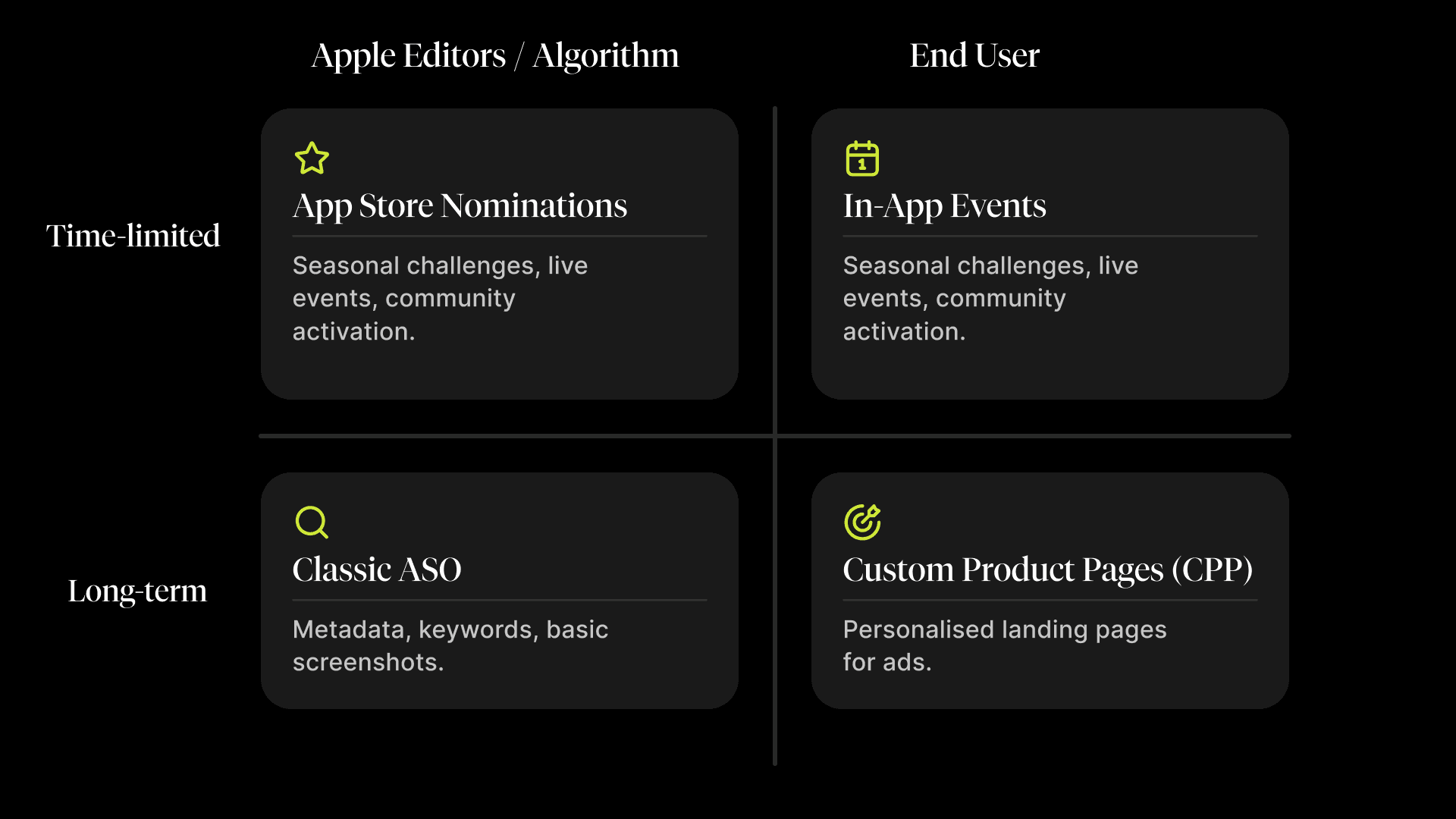
ASO often focuses on elements that are relatively static: the app’s name, subtitle, keywords, screenshots, product page or reviews. In-App Events bring a dynamic element to this and allow you to highlight a specific product or content-related moment directly in the App Store.
This is particularly useful when an app regularly deals with content, community engagement, seasonality or new features. An event card can appear on the product page, in search results and in editorially curated sections. This means the user doesn’t need to be inside the app to realise they have a reason to return to it.
From a business perspective, In-App Events can help:
- to highlight a current moment that would otherwise remain hidden within the app or in the release notes,
- to re-engage existing users who need a specific reason to return,
- to drive user acquisition, as the event communicates the app’s value right from the discovery phase,
- extend the lifespan of a campaign or content, as the App Store is becoming another communication channel,
- align product, marketing and ASO around a single specific event.
In-App Events vs. App Store Nominations: similar tools, different purposes
At first glance, In-App Events and App Store Nominations may seem similar. Both features relate to visibility in the App Store and are most effective when underpinned by a genuine product or content highlight.
The difference lies in how they reach the user.
App Store Nominations are an opportunity to get a significant new release, launch or interesting content featured in an editorially selected section of the App Store. First, however, you need to show Apple why that moment is relevant, high-quality and interesting to users.
In-App Events work in a more direct way. They are visible to users as a specific event card, and their aim is to communicate a specific, time-limited event within the app and direct users to relevant content. The communication itself is more closely tied to a specific action: clicking, returning, engaging or downloading the app.
Put simply:
- A nomination helps to get a significant moment featured in an editorially selected section of the App Store.
- An in-app event gives the user a specific reason to take action right now.
That’s why it makes sense to use both tools, but not to expect the same thing from them.
How to tell if the time is right for In-App Event
An in-app event works best when you have something to communicate as an event, not just as an update.
Suitable examples might include:
- a competition, challenge or tournament,
- a seasonal activity,
- the launch of new content,
- the release of new levels, episodes, characters or a story update,
- a live event, concert, sports broadcast or special show,
- a community activity or virtual event,
- a significant moment linked to new content or a new feature.
A good test question is: Could we explain to the user in a single sentence what is happening and why it’s worth getting involved right now?
If the answer is yes, an in-app event may be worthwhile. If the answer is more along the lines of ‘we just want more visibility’, the event itself is probably still missing.
Conversely, In-App Events are not suitable for routine daily activities, recurring rewards, price promotions without new content, or general promotional campaigns without a clear, time-limited window.
What needs to be prepared before launching an event
An in-app event is a small touchpoint in the App Store, but it relies on a number of details. If any of these fail, the user experience will quickly fall apart.
In App Store Connect, events are created under Features → In-App Events. Filling in the details is relatively straightforward. It is more important to have thought through the trigger, the value for the user and the post-click journey in advance.
In short, you will need:
- a clear trigger – the event must be specific, topical and time-limited,
- user value – it must be clear what the user will gain or experience,
- event type and badge – for example, Challenge, Competition, Live Event, Major Update, New Season or Special Event,
- title and descriptions – the event title, a short description for the event card and a longer description for the event details,
- visuals – an image or video that quickly conveys the essence of the event,
- functional deep link – clicking on it should take the user directly to the relevant content within the app,
- timing – the date and time of start, end and publication,
- availability and settings – regions, priority and any requirement for an in-app purchase or subscription.
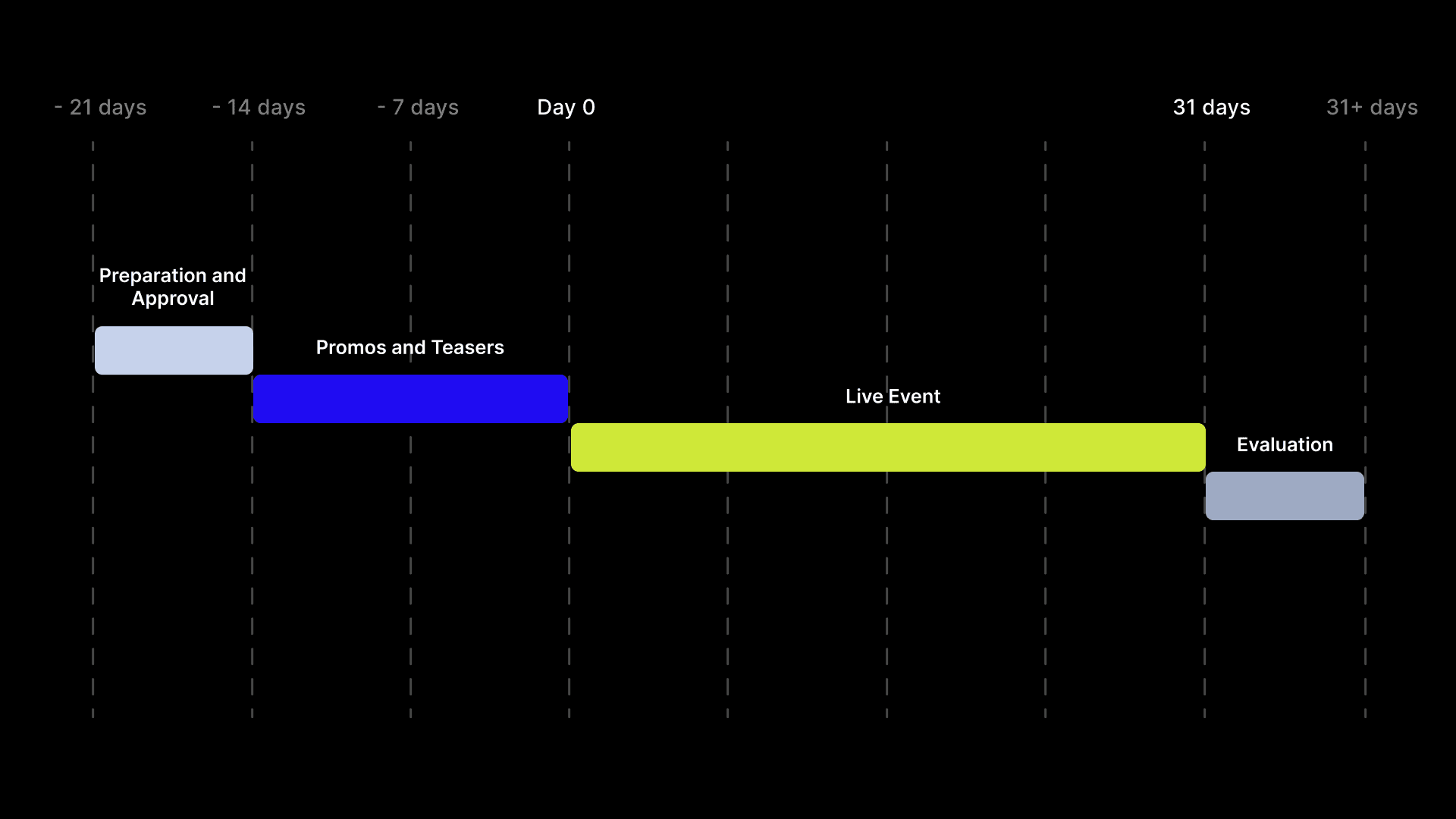
The limits are also important: an in-app event can last for a maximum of 31 days and can be promoted up to 14 days before it begins. An app can have up to 15 approved In-App Events at any one time, and up to 10 events can be published on the App Store simultaneously.
How to incorporate In-App Events into a campaign
An in-app event shouldn’t be the last detail added just before launch. It works best as part of a campaign or launch plan.
It is useful for the team to view it as a single step in the user journey:
- what the user will see in the App Store,
- where they will be taken after clicking,
- how the event is followed up with communication across other channels,
- whether it makes sense to prepare a Custom Product Page as well,
- whether the event supports user retention, adoption of a new feature, new content or user acquisition,
- and whether it’s worth preparing an App Store Nomination for the same new feature.
This way, an in-app event won’t just be another form to fill in. It will be part of a journey that begins in the App Store and continues directly within the app.
Summary
In-App Events give apps the opportunity to show that something current and time-limited is happening within them. Their strength lies in their specificity: the user sees the event, understands the reason behind it, and is taken directly to the relevant content.
This is where they differ from App Store Nominations. Both features can boost visibility, but each does so in a different way and at a different stage of the user’s interaction with the app.
They are most effective when they are not merely another option in App Store Connect, but form part of a genuine product or content moment. In such cases, they can link ASO, marketing and user activation in a way that delivers value to both the business and the user.