
A single app can appeal to different people for completely different reasons. Find out how to use Custom Product Pages to tailor its presentation to a specific audience or campaign, and link your advert to the relevant product page.
When choosing an app, users need to find the answer to one simple question quickly: Is this app right for me?
Users often form their first impression of a product before they even start using it, on its product page. They need to quickly understand what the app offers, how it works and whether it is relevant to them. If they cannot find that information, they will probably leave and look elsewhere. Even if the app actually offers exactly what they need.
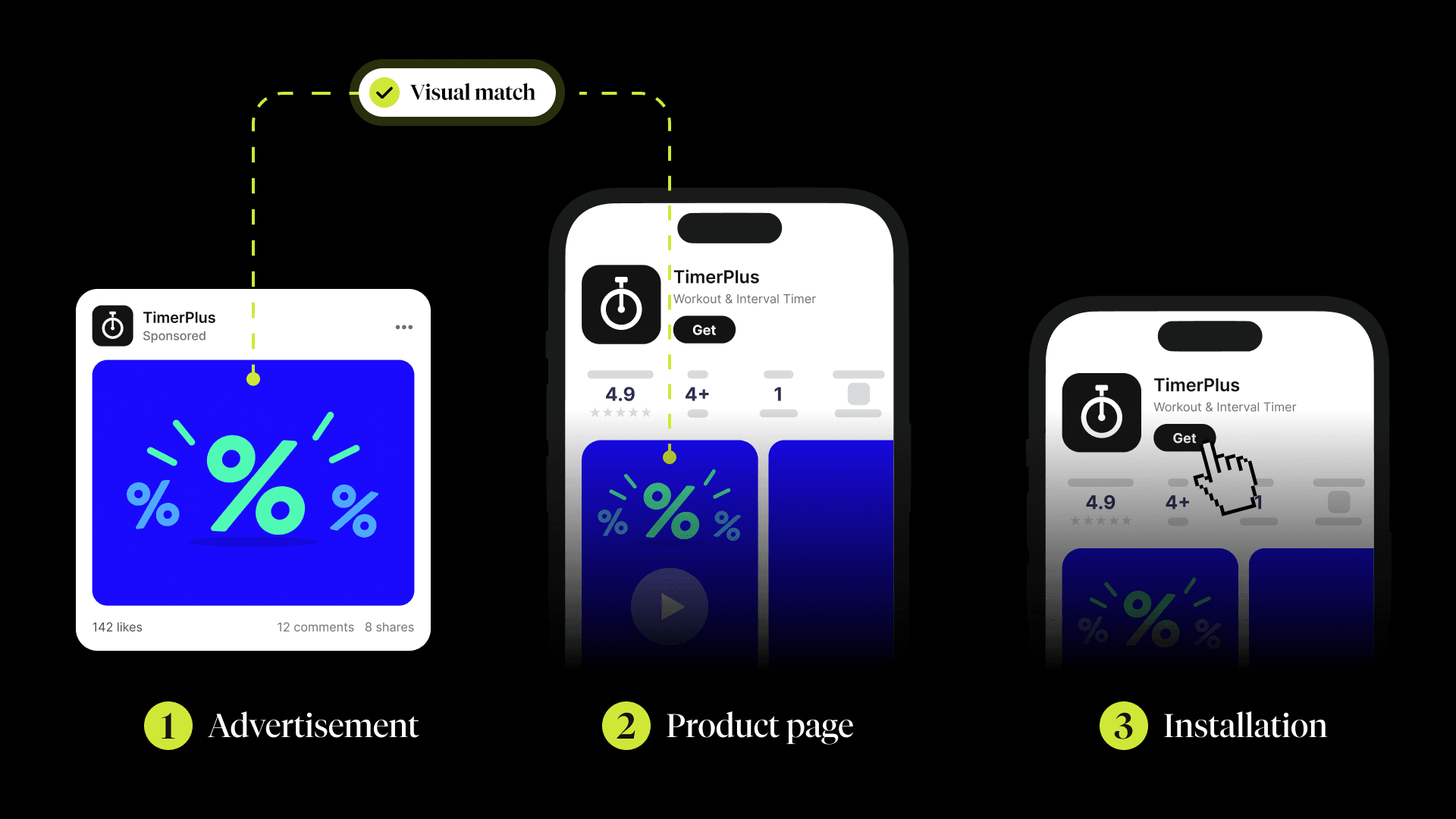
This moment is even more important in campaigns. An advert promises users a specific feature, benefit or solution to a need. However, after clicking through, they often end up on a generic product page that tries to explain the entire app at once. The original context is lost, leaving users to work out for themselves how the page they have landed on relates to what caught their attention in the advert.
Different users also arrive with different expectations. One wants to quickly understand how the app works, another is interested in a specific benefit, while someone else is looking for a solution to a particular situation. A single generic product page can therefore hardly be equally relevant to everyone.
This is exactly what Custom Product Pages are designed for. Your team can create multiple versions of a product page, each tailored to a specific audience segment, campaign or traffic source. Each version can then highlight the value that matters most to that particular audience.
When Custom Product Pages Make the Most Sense
A standard product page presents your app to a broad audience. Custom Product Pages are useful when you need to tailor your messaging to a specific context.
A custom page can be particularly useful for:
- audience segments with different motivations or levels of experience,
- campaigns focused on a specific feature or benefit,
- seasonal or themed campaigns,
- campaigns targeting a specific market,
- different value propositions,
- traffic from Apple Search Ads with a clear search intent.
A fitness app could show beginners how to get started with simple guided workouts. More experienced users, on the other hand, could be shown more intensive programmes and detailed statistics. A finance app could highlight spending insights in one campaign and secure investing in another.
How Custom Product Pages Work in Practice
In App Store Connect, you can create up to 35 Custom Product Pages for a single app. Each page has its own URL, which you can use in campaigns, on social media, in Apple Search Ads and across other external channels.
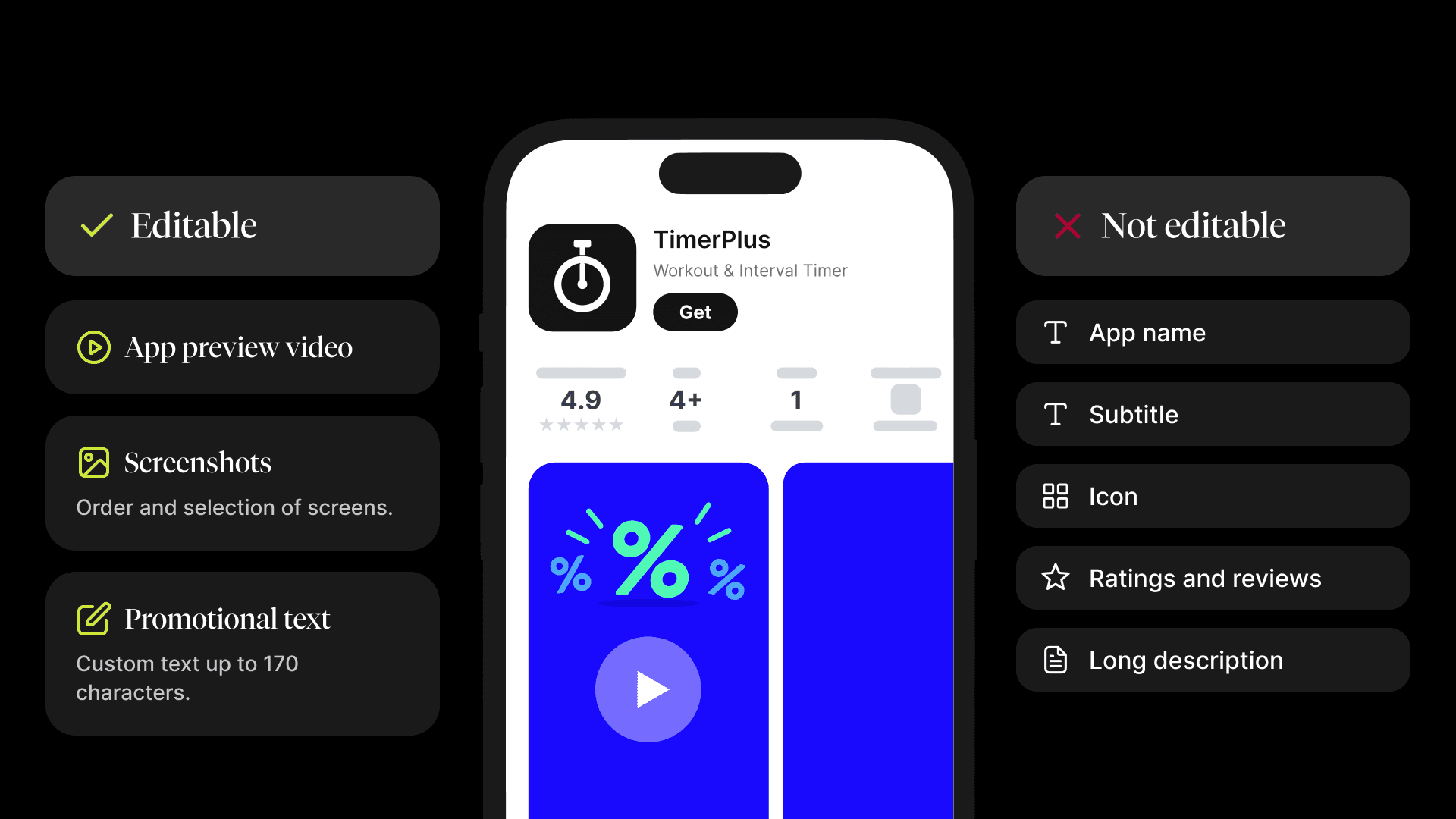
You can customise the following elements on each page:
- app screenshots and their order,
- app preview videos,
- promotional text of up to 170 characters.
The app name, subtitle, main description, ratings and reviews remain the same. Changes focus on the first visual and textual elements users encounter. Their purpose is to help users quickly understand why the app is relevant to their needs.
Apple Search Ads: A Page That Matches What Users Are Looking For
One of the most effective ways to use Custom Product Pages is to connect them with Apple Search Ads. You can assign a page to a specific group of keywords, making sure its content and visuals match what users are searching for.
If someone searches for "workout timer", they do not have to see a generic presentation of a fitness app first. The page can lead with the timer itself, show how it works and explain how it supports their workouts. For a different search, the same app can highlight training plans or progress tracking.
The goal is not to create a separate page for every keyword. A more practical approach is to group similar search intents together and create one relevant version for each group.
What to Prepare Before Creating a Page
Before setting everything up in App Store Connect, make sure you have clarified the following:
- Audience or traffic source: Identify who will land on the page and which campaign, channel or keyword group will bring them there.
- One key value proposition: Choose the benefit that is most relevant to that audience. Do not try to explain everything at once.
- Visual story: Screenshots should follow a clear sequence and show the feature in context. App screens on their own are often not enough to explain their value.
- Campaign consistency: The text and visuals should continue the story users saw before clicking through.
- Expected user action: Decide what users should do after opening the page and what information will help them take that step.
- Measurable hypothesis: Define what you want to learn or improve and how you will evaluate the page.
- Clear internal naming: Users will not see the reference name, but it should help your team quickly identify the page's purpose, channel, audience segment or campaign period.
You can then create a new Custom Product Page in App Store Connect, select a localisation, add your visuals and promotional text, and review the preview. Once generated, assign its URL to the relevant campaign or channel.
Always test the page before launching it. An incorrect link could send your entire audience to a different version of the page, undermining both the user journey and your campaign results.
How to Tell Whether Your Page Is Working
Once the page is live, monitor how the specific audience responds to it. App Store Connect provides separate performance data for each version.
Pay particular attention to:
- product page views,
- downloads,
- conversion rate.
Pages may attract traffic from different channels, campaigns and audiences. Conversion rates should therefore always be considered alongside the traffic source, creative, targeting and data volume.
If one version performs better, try to understand what convinced users to download the app. Perhaps a more specific benefit made the difference. Maybe the sequence of screenshots was clearer, or the page matched the advert more closely. You can apply these insights to future campaigns, your main product page and even the product itself.
Common Mistakes to Avoid with Custom Product Pages
One of the most common mistakes is creating too many pages without a clear reason. Every additional version means more visuals, localisations, URLs, campaigns and results to manage. Without a distinct audience and a clear hypothesis, complexity can grow faster than the value these pages deliver.
Also, watch out for:
- misleading presentations of features and benefits,
- weak visuals that undermine the app's credibility,
- outdated seasonal pages.
How Custom Product Pages Fit into a Broader ASO Strategy
Custom Product Pages work best alongside other App Store tools.
Product Page Optimisation helps you test elements of your main product page and find out which version performs better with a broader audience. Custom Product Pages, on the other hand, focus on specific audience segments, campaigns or traffic sources. Insights from one tool can inform how you use the other, but their purposes are different.
In-App Events promote current, time-limited events directly in the App Store. If you also support an event with an external campaign, a Custom Product Page can maintain the same story and visual direction after users click through.
Summary
Custom Product Pages allow you to tailor your product page to a specific audience, campaign or search intent. They work best when built around a clear hypothesis, aligned with the traffic source and evaluated by your team based on actual results.